

Support FAQ - My Account
Get quick answers to your account-related questions. Learn how to request a login, get a sublogin, and resolve login issues hassle-free.
Support & Complaints
If you have previously requested your login, we recommend that you check your e-mail inbox, including the spam folder.
If you have forgotten your password, you can request it again using the "Reset password" function. If you do not yet have an account, you can create a new account by completing the form in the "Register" section.
A sublogin is an additional username and password that depends on a main account. This is particularly useful for larger companies with multiple employees who need access to perform checks or place orders.
Please follow these steps:
My Account >> Login Management >> New Sublogin
I can't log in. If you are having problems logging into your account via this page, please first check that your username and password are correct.
If you have forgotten your username or password, don't worry, it happens. Simply go to "Login" and click on "Forgot password" to reset your login details.
Please note that the new login details will be sent to the email address you provided when you registered.
If you still have problems logging in to your customer area, please get in touch with our SF-Filter team in your area or send us a contact form. We are always available to help you solve your log-in problems.
Please contact our accounting department to obtain a bank statement.
You can do this by contacting our accounting team either via email or through the contact form. We are here to assist you with your request.
Please fill out the contact form and specify the reason for your change of address.
We will promptly address your request and ensure that your concerns are handled appropriately.
Account Management
If you're having trouble logging into your account, please first check if your username and password are correct. If you've forgotten your username or password, don't worry, it happens. You can reset password clicking on My Account >> Sign in >> Forgot Password. Please note that the new login details will be sent to the email address you provided during registration. If you continue to experience issues logging into your customer area, please contact us through the form below. We're here to assist you with resolving your login problems at any time.
If you have forgotten your password, we offer you the possibility to reset it. From the Homepage, click on My Account >> Sign in >> Forgot Password. Follow the instructions to create a new password and regain access to your account. If you need further assistance, we are happy to help.
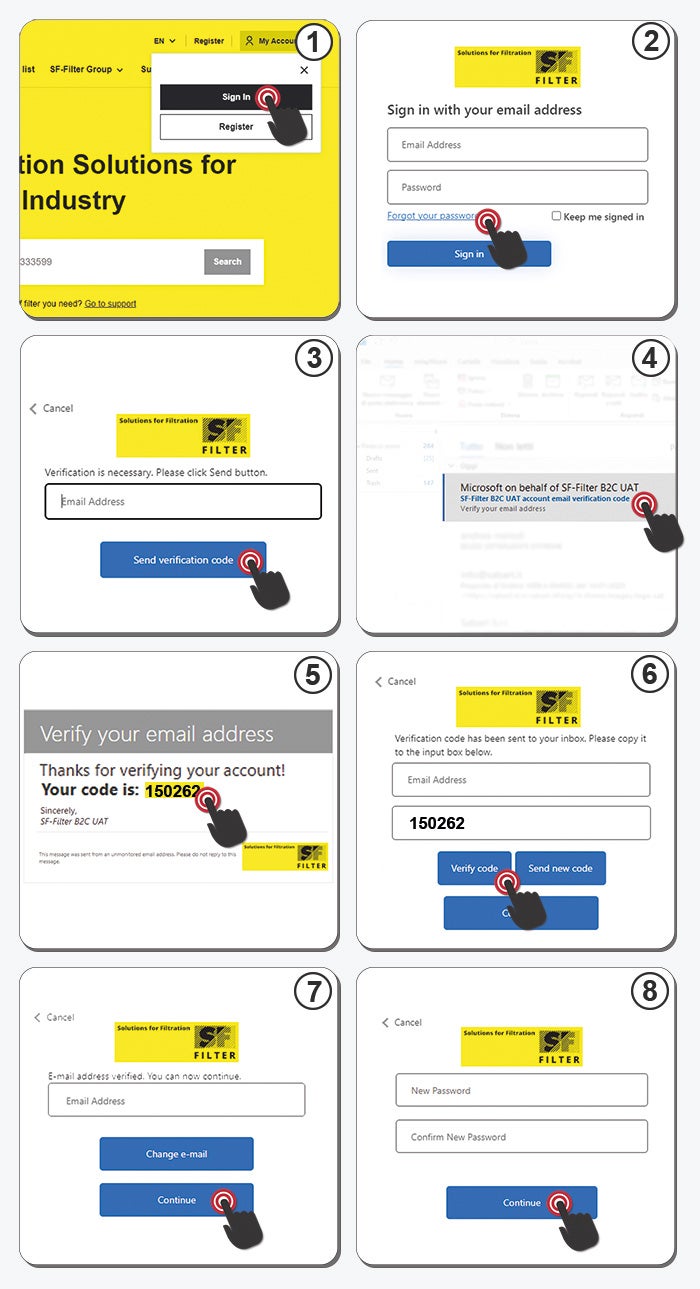
If you don't have an account, it's necessary to register and complete the verification process.
Once your account has been verified, you can access our webshop.
After logging in, you can view prices, availability, and make a purchase.
Creating an account is easy. on the homepage, fill out the form with your personal information. To complete the registration you will need to access your mailbox. You will receive an email with your username that you need to confirm, and another email with your password. You can then start shopping immediately.
If you have completed the first part of the registration, we recommend checking your email inbox, including the spam folder. You should have received an email with your username that you need to confirm, and another email with your password. If the problem persists, don't hesitate to contact us trough the form below.
The account verification could not be completed if the email was incorrect during registration. Please proceed with a new registration using the correct email address.
A sublogin is an additional username and password that depends on a main account. This is particularly useful for larger companies with multiple employees who need access to perform checks or place orders. Please follow these steps: My Account >> Login Management >> New Sublogin
Personal Information
Protecting your personal data is our top priority. Detailed information about our privacy policies can be found in our privacy policy.
To change your address, please log in to your account on our website. There you will find the option to manage your personal data, including your address. Follow the instructions to make the necessary changes and ensure your deliveries are delivered correctly.
If you wish to contact our customer service, the following information will facilitate the processing of your request:
- Customer number or order number
- Details of your concern
- Contact details (phone number and email address)
- Other relevant information such as product numbers or order dates
Subscription Preferences
You can subscribe to the newsletter directly in our online shop. Find the appropriate option and follow the registration instructions.
Contact us form
Contact us quickly and easily using this form.